> ## Documentation Index
> Fetch the complete documentation index at: https://docs-staging-chore-events-autoupdate.mintlify.site/llms.txt
> Use this file to discover all available pages before exploring further.

> Découvrez comment configurer un formulaire de mise à jour de politique à l’aide de Forms for Actions afin que les utilisateurs puissent examiner et accepter de nouvelles conditions d’utilisation ou des mises à jour de consentement.

# Cas d’utilisation : Configurer un formulaire de mise à jour de politique à l’aide de Forms

<Card title="Avant de commencer">
  1. Créez une [application Machine-to-Machine](/docs/fr-ca/get-started/auth0-overview/create-applications/machine-to-machine-apps) avec les scopes suivants activés :

  * `read:users`
  * `update:users`
  * `create:users`
  * `read:users_app_metadata`
  * `update:users_app_metadata`
  * `create:users_app_metadata`

  2. Ajoutez une [connexion Vault](/docs/fr-ca/customize/forms/vault) à l’aide des identifiants de l’application M2M.
</Card>

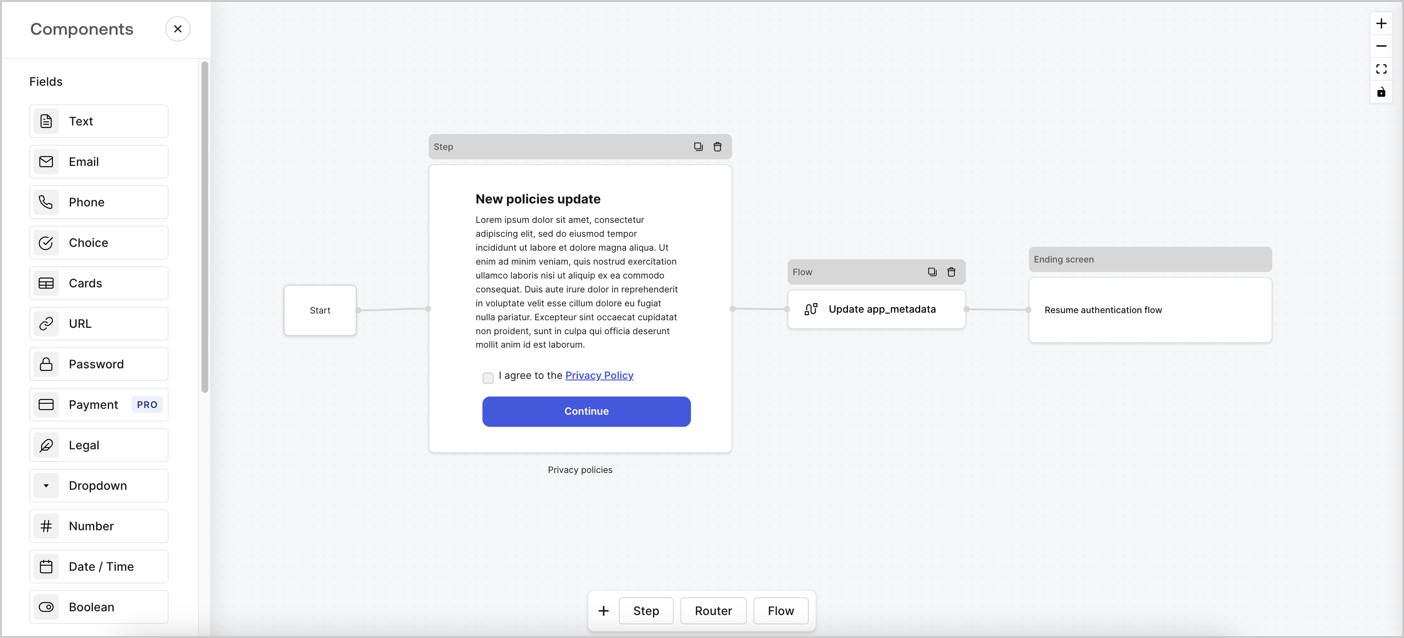
Forms for Actions vous permet de créer des flux personnalisés liés aux politiques de confidentialité et d’enregistrer le consentement dans l’objet `app_metadata`.
<Frame>
  <img src="https://mintcdn.com/docs-staging-chore-events-autoupdate/98W2_Y-L23YJndAZ/docs/images/cdy7uua7fh8z/6i68dMvHDTijfRmSgN1x8Q/ad900e7d4c0fb34645921435472b8684/privavy-policy-form.png?fit=max&auto=format&n=98W2_Y-L23YJndAZ&q=85&s=4468bcc5195e667598b883ab947c5240" alt="Dashboard > Actions > Forms > Cas d’utilisation de politique de confidentialité" data-og-width="1404" width="1404" data-og-height="638" height="638" data-path="docs/images/cdy7uua7fh8z/6i68dMvHDTijfRmSgN1x8Q/ad900e7d4c0fb34645921435472b8684/privavy-policy-form.png" data-optimize="true" data-opv="3" srcset="https://mintcdn.com/docs-staging-chore-events-autoupdate/98W2_Y-L23YJndAZ/docs/images/cdy7uua7fh8z/6i68dMvHDTijfRmSgN1x8Q/ad900e7d4c0fb34645921435472b8684/privavy-policy-form.png?w=280&fit=max&auto=format&n=98W2_Y-L23YJndAZ&q=85&s=bcf59b4fc40f38e5527db0bb6ec55686 280w, https://mintcdn.com/docs-staging-chore-events-autoupdate/98W2_Y-L23YJndAZ/docs/images/cdy7uua7fh8z/6i68dMvHDTijfRmSgN1x8Q/ad900e7d4c0fb34645921435472b8684/privavy-policy-form.png?w=560&fit=max&auto=format&n=98W2_Y-L23YJndAZ&q=85&s=726be192b4ad162ac885f32d2996acf4 560w, https://mintcdn.com/docs-staging-chore-events-autoupdate/98W2_Y-L23YJndAZ/docs/images/cdy7uua7fh8z/6i68dMvHDTijfRmSgN1x8Q/ad900e7d4c0fb34645921435472b8684/privavy-policy-form.png?w=840&fit=max&auto=format&n=98W2_Y-L23YJndAZ&q=85&s=5532f1b15b88ff562377cb5c2e5729df 840w, https://mintcdn.com/docs-staging-chore-events-autoupdate/98W2_Y-L23YJndAZ/docs/images/cdy7uua7fh8z/6i68dMvHDTijfRmSgN1x8Q/ad900e7d4c0fb34645921435472b8684/privavy-policy-form.png?w=1100&fit=max&auto=format&n=98W2_Y-L23YJndAZ&q=85&s=2307fa17fe6e5c8466143faba67f9a2d 1100w, https://mintcdn.com/docs-staging-chore-events-autoupdate/98W2_Y-L23YJndAZ/docs/images/cdy7uua7fh8z/6i68dMvHDTijfRmSgN1x8Q/ad900e7d4c0fb34645921435472b8684/privavy-policy-form.png?w=1650&fit=max&auto=format&n=98W2_Y-L23YJndAZ&q=85&s=683632d742a9f8f542dc20d87655e172 1650w, https://mintcdn.com/docs-staging-chore-events-autoupdate/98W2_Y-L23YJndAZ/docs/images/cdy7uua7fh8z/6i68dMvHDTijfRmSgN1x8Q/ad900e7d4c0fb34645921435472b8684/privavy-policy-form.png?w=2500&fit=max&auto=format&n=98W2_Y-L23YJndAZ&q=85&s=eca0b7f457200ba92d0ec912d5265677 2500w" />
</Frame>

Les sections ci-dessous expliquent comment créer un formulaire de mise à jour de politique à l’aide de nœuds et de flux, ainsi que les étapes pour ajouter votre formulaire à une Action [Post Login](/docs/fr-ca/customize/actions/explore-triggers/signup-and-login-triggers/login-trigger).

<h2 id="create-a-form-from-scratch">
  Créer un formulaire à partir de zéro
</h2>

Suivez ces étapes pour créer un formulaire afin de recueillir des informations :

1. Ouvrez l’éditeur de formulaires en sélectionnant **Auth0 Dashboard > Actions > Forms.**
2. Sélectionnez **Create Form** > **Start from scratch**.

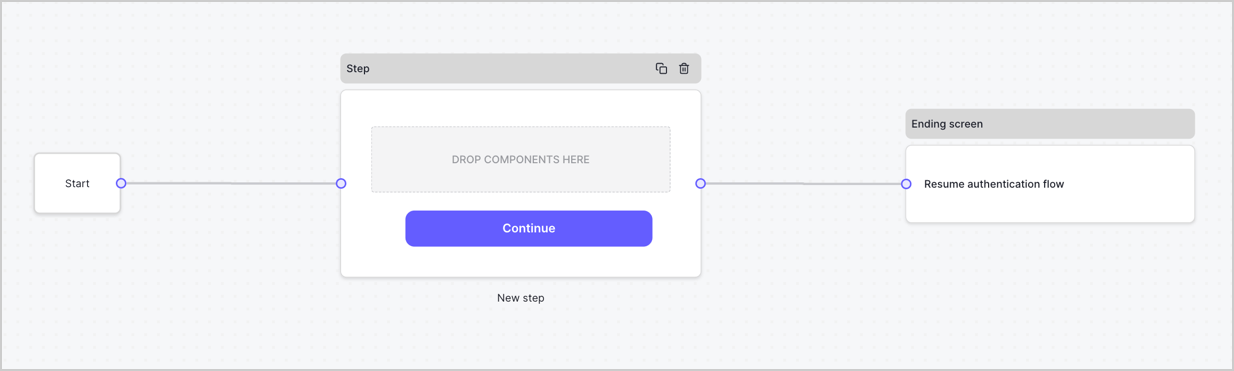
Par défaut, un nouveau formulaire contient un nœud Start, un nœud Step et un nœud Ending screen.
<Frame>
  <img src="https://mintcdn.com/docs-staging-chore-events-autoupdate/pcHJQgtevaBQ-IbW/docs/images/cdy7uua7fh8z/2TZ9jSjgEcARFpULI6hz4R/a4319a1bd482f2ee5cc23100fdb2f42c/New-form-Forms-for-action-use-case.png?fit=max&auto=format&n=pcHJQgtevaBQ-IbW&q=85&s=bd8664d5a8f3adb9ba9e9521277b9f80" alt="Dashboard > Forms > Use Cases > Form" data-og-width="1234" width="1234" data-og-height="371" height="371" data-path="docs/images/cdy7uua7fh8z/2TZ9jSjgEcARFpULI6hz4R/a4319a1bd482f2ee5cc23100fdb2f42c/New-form-Forms-for-action-use-case.png" data-optimize="true" data-opv="3" srcset="https://mintcdn.com/docs-staging-chore-events-autoupdate/pcHJQgtevaBQ-IbW/docs/images/cdy7uua7fh8z/2TZ9jSjgEcARFpULI6hz4R/a4319a1bd482f2ee5cc23100fdb2f42c/New-form-Forms-for-action-use-case.png?w=280&fit=max&auto=format&n=pcHJQgtevaBQ-IbW&q=85&s=1f67f1665ad460b78d69554dc09707a5 280w, https://mintcdn.com/docs-staging-chore-events-autoupdate/pcHJQgtevaBQ-IbW/docs/images/cdy7uua7fh8z/2TZ9jSjgEcARFpULI6hz4R/a4319a1bd482f2ee5cc23100fdb2f42c/New-form-Forms-for-action-use-case.png?w=560&fit=max&auto=format&n=pcHJQgtevaBQ-IbW&q=85&s=4e8b0a823a5f0fe57d8748ad22978ebe 560w, https://mintcdn.com/docs-staging-chore-events-autoupdate/pcHJQgtevaBQ-IbW/docs/images/cdy7uua7fh8z/2TZ9jSjgEcARFpULI6hz4R/a4319a1bd482f2ee5cc23100fdb2f42c/New-form-Forms-for-action-use-case.png?w=840&fit=max&auto=format&n=pcHJQgtevaBQ-IbW&q=85&s=42429091e06a2e8644efd4d7935db466 840w, https://mintcdn.com/docs-staging-chore-events-autoupdate/pcHJQgtevaBQ-IbW/docs/images/cdy7uua7fh8z/2TZ9jSjgEcARFpULI6hz4R/a4319a1bd482f2ee5cc23100fdb2f42c/New-form-Forms-for-action-use-case.png?w=1100&fit=max&auto=format&n=pcHJQgtevaBQ-IbW&q=85&s=b0480b23d7ca03bfaf71dc70c591c400 1100w, https://mintcdn.com/docs-staging-chore-events-autoupdate/pcHJQgtevaBQ-IbW/docs/images/cdy7uua7fh8z/2TZ9jSjgEcARFpULI6hz4R/a4319a1bd482f2ee5cc23100fdb2f42c/New-form-Forms-for-action-use-case.png?w=1650&fit=max&auto=format&n=pcHJQgtevaBQ-IbW&q=85&s=0bdeb7d60588f07348c50371749cee67 1650w, https://mintcdn.com/docs-staging-chore-events-autoupdate/pcHJQgtevaBQ-IbW/docs/images/cdy7uua7fh8z/2TZ9jSjgEcARFpULI6hz4R/a4319a1bd482f2ee5cc23100fdb2f42c/New-form-Forms-for-action-use-case.png?w=2500&fit=max&auto=format&n=pcHJQgtevaBQ-IbW&q=85&s=dc02272d7692f30582e3b169bfe165b4 2500w" />
</Frame>

<h3 id="configure-the-step-node">
  Configurer le nœud Step
</h3>

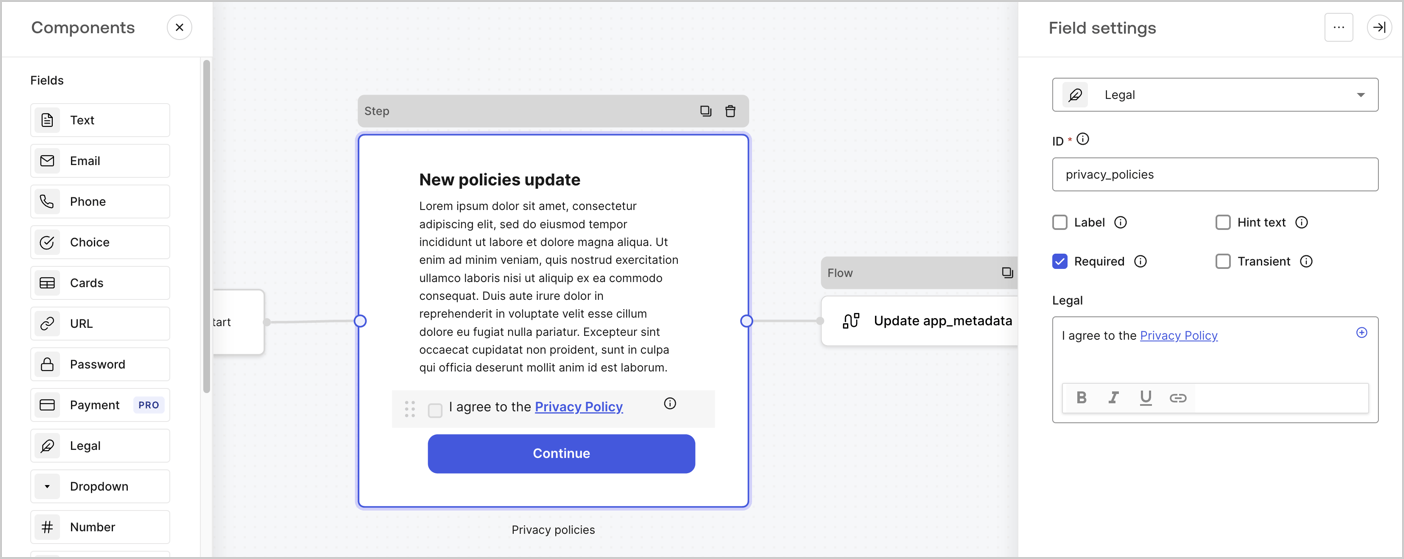
Le nœud Step est l’interface graphique visible par les utilisateurs. Ajoutez des [champs](/docs/fr-ca/customize/forms/nodes-and-components) au nœud Step pour recueillir la nouvelle valeur d’acceptation en suivant ces étapes :

1. Faites glisser un champ **Texte enrichi** du **menu Composants** vers le nœud **Step**.

   * **Texte enrichi** : Saisissez une description des mises à jour apportées à votre politique de confidentialité.
   * Sélectionnez **Enregistrer**.
2. Faites glisser un champ **Juridique** vers le nœud **Step**.

   * **ID** : Saisissez `privacy_policies`.
   * **Obligatoire** : Cochez la case.
   * **Juridique** : Saisissez `J’accepte la politique de confidentialité`.
   * Sélectionnez **Enregistrer**.
3. Sélectionnez **Publier** pour enregistrer.
<Frame>
  <img src="https://mintcdn.com/docs-staging-chore-events-autoupdate/12G97kMYRYfQpTHS/docs/images/cdy7uua7fh8z/59zFFjQjAnjogkc2QGIqqJ/0ad66b1b636544122aa4e65968b76c2c/privacy-policy-step-node.png?fit=max&auto=format&n=12G97kMYRYfQpTHS&q=85&s=e3efd07280f768c4f3cd55fbea64d70b" alt="Dashboard > Actions > Forms > Cas d’utilisation du nœud Step de la politique de confidentialité" data-og-width="1404" width="1404" data-og-height="559" height="559" data-path="docs/images/cdy7uua7fh8z/59zFFjQjAnjogkc2QGIqqJ/0ad66b1b636544122aa4e65968b76c2c/privacy-policy-step-node.png" data-optimize="true" data-opv="3" srcset="https://mintcdn.com/docs-staging-chore-events-autoupdate/12G97kMYRYfQpTHS/docs/images/cdy7uua7fh8z/59zFFjQjAnjogkc2QGIqqJ/0ad66b1b636544122aa4e65968b76c2c/privacy-policy-step-node.png?w=280&fit=max&auto=format&n=12G97kMYRYfQpTHS&q=85&s=e6e2c7b4e93a01b2f7976c0067b261ce 280w, https://mintcdn.com/docs-staging-chore-events-autoupdate/12G97kMYRYfQpTHS/docs/images/cdy7uua7fh8z/59zFFjQjAnjogkc2QGIqqJ/0ad66b1b636544122aa4e65968b76c2c/privacy-policy-step-node.png?w=560&fit=max&auto=format&n=12G97kMYRYfQpTHS&q=85&s=162aa185936495dd5e3f6df985a87298 560w, https://mintcdn.com/docs-staging-chore-events-autoupdate/12G97kMYRYfQpTHS/docs/images/cdy7uua7fh8z/59zFFjQjAnjogkc2QGIqqJ/0ad66b1b636544122aa4e65968b76c2c/privacy-policy-step-node.png?w=840&fit=max&auto=format&n=12G97kMYRYfQpTHS&q=85&s=1f65970d48f59a0254a34c486d3d008a 840w, https://mintcdn.com/docs-staging-chore-events-autoupdate/12G97kMYRYfQpTHS/docs/images/cdy7uua7fh8z/59zFFjQjAnjogkc2QGIqqJ/0ad66b1b636544122aa4e65968b76c2c/privacy-policy-step-node.png?w=1100&fit=max&auto=format&n=12G97kMYRYfQpTHS&q=85&s=fc052743b6d6877a6a24c1874594128e 1100w, https://mintcdn.com/docs-staging-chore-events-autoupdate/12G97kMYRYfQpTHS/docs/images/cdy7uua7fh8z/59zFFjQjAnjogkc2QGIqqJ/0ad66b1b636544122aa4e65968b76c2c/privacy-policy-step-node.png?w=1650&fit=max&auto=format&n=12G97kMYRYfQpTHS&q=85&s=3212aaf463bd25a5a28688f4348bd9fc 1650w, https://mintcdn.com/docs-staging-chore-events-autoupdate/12G97kMYRYfQpTHS/docs/images/cdy7uua7fh8z/59zFFjQjAnjogkc2QGIqqJ/0ad66b1b636544122aa4e65968b76c2c/privacy-policy-step-node.png?w=2500&fit=max&auto=format&n=12G97kMYRYfQpTHS&q=85&s=76109e9297f1433c40c879d7d1073717 2500w" />
</Frame>

<h3 id="configure-the-flow-node">
  Configurer le nœud **Flow**
</h3>

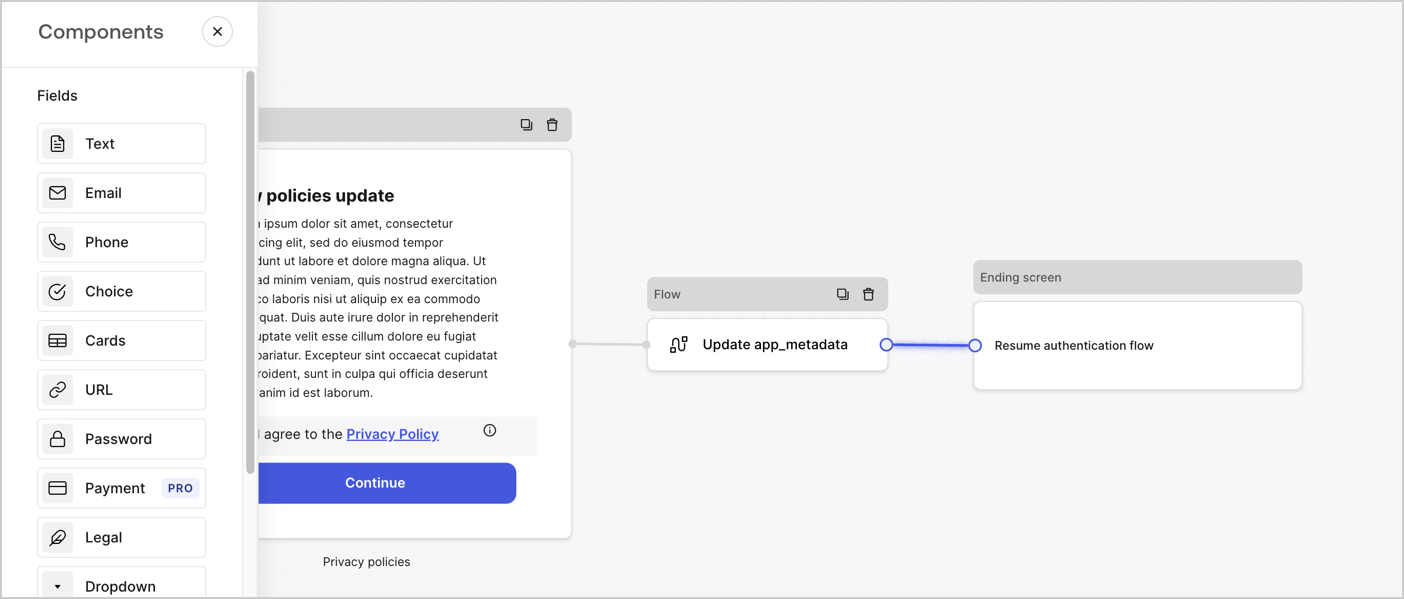
Ajoutez un nœud **Flow** après le nœud **Step** pour mettre à jour `app_metadata` et reprendre le flux d’authentification en suivant les étapes ci-dessous :

1. Sélectionnez **Flow** au bas de l’éditeur de formulaires.
2. Supprimez le lien existant entre les nœuds **Step** et **Ending Screen**.
3. Sélectionnez le nouveau **Flow** > **Click to add a flow** > **Create a new flow.**

   * Entrez `Update app_metadata` dans le champ **Name**.
   * Sélectionnez **Create**.
   * Sélectionnez **Save**.
4. Reliez le nœud **Flow** aux nœuds **Step** et **Ending Screen**, comme illustré ci-dessous.
5. Sélectionnez **Publish** pour enregistrer.
<Frame>
  <img src="https://mintcdn.com/docs-staging-chore-events-autoupdate/98W2_Y-L23YJndAZ/docs/images/cdy7uua7fh8z/6YIkzm7SrpM9LW76AXuRzh/353c518fe82bbaa440836da1d83596d6/link-policies.png?fit=max&auto=format&n=98W2_Y-L23YJndAZ&q=85&s=c2ce7f013bbd728817ffb3f685559a5c" alt="Dashboard > Actions > Forms > Form" data-og-width="1404" width="1404" data-og-height="599" height="599" data-path="docs/images/cdy7uua7fh8z/6YIkzm7SrpM9LW76AXuRzh/353c518fe82bbaa440836da1d83596d6/link-policies.png" data-optimize="true" data-opv="3" srcset="https://mintcdn.com/docs-staging-chore-events-autoupdate/98W2_Y-L23YJndAZ/docs/images/cdy7uua7fh8z/6YIkzm7SrpM9LW76AXuRzh/353c518fe82bbaa440836da1d83596d6/link-policies.png?w=280&fit=max&auto=format&n=98W2_Y-L23YJndAZ&q=85&s=5848a0dd6e922810eb32d274e502323a 280w, https://mintcdn.com/docs-staging-chore-events-autoupdate/98W2_Y-L23YJndAZ/docs/images/cdy7uua7fh8z/6YIkzm7SrpM9LW76AXuRzh/353c518fe82bbaa440836da1d83596d6/link-policies.png?w=560&fit=max&auto=format&n=98W2_Y-L23YJndAZ&q=85&s=5d5fcad19db8cc4f2d86db84be2c2a0a 560w, https://mintcdn.com/docs-staging-chore-events-autoupdate/98W2_Y-L23YJndAZ/docs/images/cdy7uua7fh8z/6YIkzm7SrpM9LW76AXuRzh/353c518fe82bbaa440836da1d83596d6/link-policies.png?w=840&fit=max&auto=format&n=98W2_Y-L23YJndAZ&q=85&s=f87de6de9a9abbc5f747dbfaff8241e9 840w, https://mintcdn.com/docs-staging-chore-events-autoupdate/98W2_Y-L23YJndAZ/docs/images/cdy7uua7fh8z/6YIkzm7SrpM9LW76AXuRzh/353c518fe82bbaa440836da1d83596d6/link-policies.png?w=1100&fit=max&auto=format&n=98W2_Y-L23YJndAZ&q=85&s=ed229389fc19695ece5ae53ed9d5be10 1100w, https://mintcdn.com/docs-staging-chore-events-autoupdate/98W2_Y-L23YJndAZ/docs/images/cdy7uua7fh8z/6YIkzm7SrpM9LW76AXuRzh/353c518fe82bbaa440836da1d83596d6/link-policies.png?w=1650&fit=max&auto=format&n=98W2_Y-L23YJndAZ&q=85&s=46f4dc1417f26827ca860c11de61d5ab 1650w, https://mintcdn.com/docs-staging-chore-events-autoupdate/98W2_Y-L23YJndAZ/docs/images/cdy7uua7fh8z/6YIkzm7SrpM9LW76AXuRzh/353c518fe82bbaa440836da1d83596d6/link-policies.png?w=2500&fit=max&auto=format&n=98W2_Y-L23YJndAZ&q=85&s=67a7515e9a626043fd394cbc286b8a65 2500w" />
</Frame>

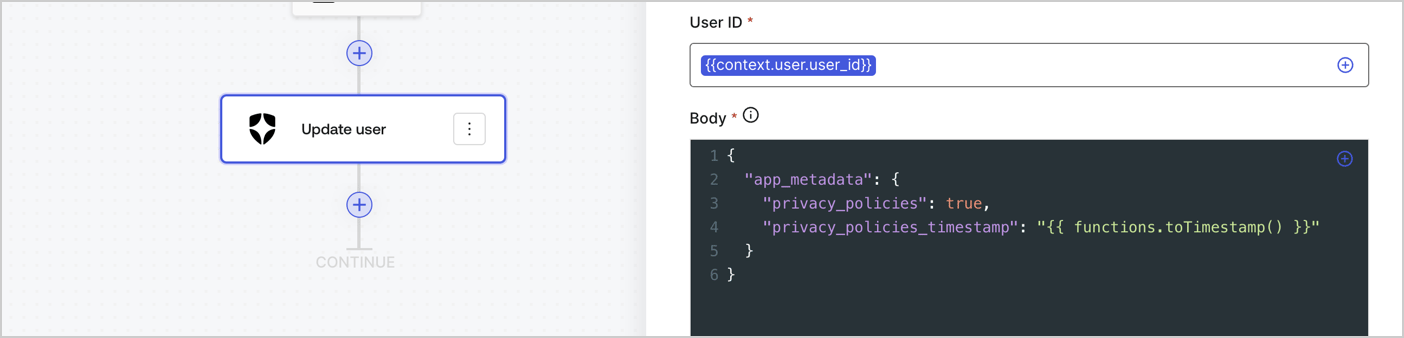
Ajoutez une action Auth0 **Update user** au flux en suivant les étapes ci-dessous :

1. Sélectionnez **Flow** **Update app\_metadata** > **Edit flow** pour ouvrir l’éditeur de flux dans un nouvel onglet.
2. Sous le StartAction, sélectionnez l’icône **+** pour ajouter une action **Update user**. Remplissez les champs ci-dessous, puis sélectionnez **Save** pour continuer.

   * **Connection** : Dans la liste déroulante, sélectionnez la connexion Vault de votre application M2M.

   * **User ID** : Entrez `{{context.user.user_id}}`.

   * **Body** : Copiez-collez le code suivant pour mettre à jour `app_metadata` avec les propriétés `privacy_policies` et `privacy_policies_timestamp`.

     ```text lines theme={null}
     {
       "app_metadata": {
         "privacy_policies": true,
         "privacy_policies_timestamp": "{{ functions.toTimestamp() }}"
       }
     }
     ```

   * Sélectionnez **Save**.
3. Sélectionnez **Publish** pour enregistrer.
<Frame>
  <img src="https://mintcdn.com/docs-staging-chore-events-autoupdate/c6Tbxku74LPACg53/docs/images/cdy7uua7fh8z/CvMNIwWrOUwaFW4X3G28p/1fb70ae57a20749d9ffaaba8dc0b7e26/update-user-privacy.png?fit=max&auto=format&n=c6Tbxku74LPACg53&q=85&s=69787de6a1b115a953f51666a62ae1e4" alt="Dashboard > Actions > Forms > User case privacy policy code" data-og-width="1404" width="1404" data-og-height="338" height="338" data-path="docs/images/cdy7uua7fh8z/CvMNIwWrOUwaFW4X3G28p/1fb70ae57a20749d9ffaaba8dc0b7e26/update-user-privacy.png" data-optimize="true" data-opv="3" srcset="https://mintcdn.com/docs-staging-chore-events-autoupdate/c6Tbxku74LPACg53/docs/images/cdy7uua7fh8z/CvMNIwWrOUwaFW4X3G28p/1fb70ae57a20749d9ffaaba8dc0b7e26/update-user-privacy.png?w=280&fit=max&auto=format&n=c6Tbxku74LPACg53&q=85&s=59719f666cfbe2d124f579ba1a07e326 280w, https://mintcdn.com/docs-staging-chore-events-autoupdate/c6Tbxku74LPACg53/docs/images/cdy7uua7fh8z/CvMNIwWrOUwaFW4X3G28p/1fb70ae57a20749d9ffaaba8dc0b7e26/update-user-privacy.png?w=560&fit=max&auto=format&n=c6Tbxku74LPACg53&q=85&s=fe087a25344ec4385c471e9d6aef1263 560w, https://mintcdn.com/docs-staging-chore-events-autoupdate/c6Tbxku74LPACg53/docs/images/cdy7uua7fh8z/CvMNIwWrOUwaFW4X3G28p/1fb70ae57a20749d9ffaaba8dc0b7e26/update-user-privacy.png?w=840&fit=max&auto=format&n=c6Tbxku74LPACg53&q=85&s=d24a52fe5f29cf4d2bd952ce152704b9 840w, https://mintcdn.com/docs-staging-chore-events-autoupdate/c6Tbxku74LPACg53/docs/images/cdy7uua7fh8z/CvMNIwWrOUwaFW4X3G28p/1fb70ae57a20749d9ffaaba8dc0b7e26/update-user-privacy.png?w=1100&fit=max&auto=format&n=c6Tbxku74LPACg53&q=85&s=8debde86aac22bbdc9983c30cf7df2b2 1100w, https://mintcdn.com/docs-staging-chore-events-autoupdate/c6Tbxku74LPACg53/docs/images/cdy7uua7fh8z/CvMNIwWrOUwaFW4X3G28p/1fb70ae57a20749d9ffaaba8dc0b7e26/update-user-privacy.png?w=1650&fit=max&auto=format&n=c6Tbxku74LPACg53&q=85&s=a4b317a3d0431ebccf817ac821023bf6 1650w, https://mintcdn.com/docs-staging-chore-events-autoupdate/c6Tbxku74LPACg53/docs/images/cdy7uua7fh8z/CvMNIwWrOUwaFW4X3G28p/1fb70ae57a20749d9ffaaba8dc0b7e26/update-user-privacy.png?w=2500&fit=max&auto=format&n=c6Tbxku74LPACg53&q=85&s=fd5f8411650432dc812ef821dc93ac02 2500w" />
</Frame>

<Callout icon="file-lines" color="#0EA5E9" iconType="regular">
  Le flux **Update app\_metadata** ajoute la valeur `privacy_policies true` à l’objet `app_metadata` et génère aussi un horodatage à l’aide d’une [fonction utilitaire.](/docs/fr-ca/customize/forms/variables)
</Callout>

<h2 id="retrieve-the-form-render-code">
  Récupérer le code de rendu du formulaire
</h2>

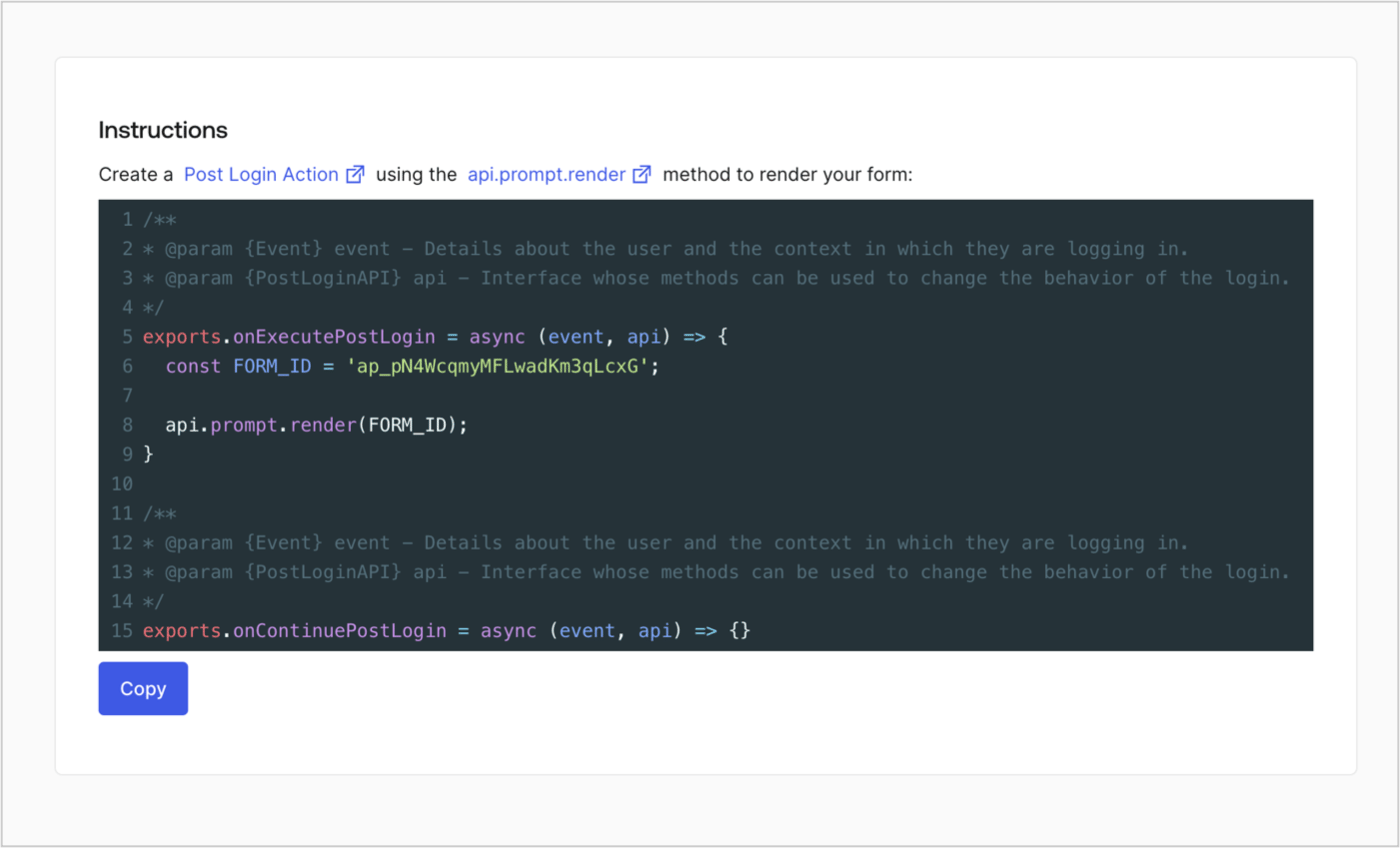
Récupérez le code de rendu de votre formulaire afin d’afficher le formulaire au moyen d’une Action Post Login personnalisée en suivant ces étapes :

* Dans l’éditeur de formulaires, sélectionnez **`<> Render`**.
* Sélectionnez **Copy**.
<Frame>
  <img src="https://mintcdn.com/docs-staging-chore-events-autoupdate/ofS79UqxQk3qmkew/docs/images/cdy7uua7fh8z/2EIUzc539sq9lwoTKbjoJv/496a864c0fc44a782c9cadca119dbfb0/embed.png?fit=max&auto=format&n=ofS79UqxQk3qmkew&q=85&s=9fd0679dec5921abac0e90f621e15faf" alt="Dashboard > Actions > Forms > Form > Embed" data-og-width="1400" width="1400" data-og-height="848" height="848" data-path="docs/images/cdy7uua7fh8z/2EIUzc539sq9lwoTKbjoJv/496a864c0fc44a782c9cadca119dbfb0/embed.png" data-optimize="true" data-opv="3" srcset="https://mintcdn.com/docs-staging-chore-events-autoupdate/ofS79UqxQk3qmkew/docs/images/cdy7uua7fh8z/2EIUzc539sq9lwoTKbjoJv/496a864c0fc44a782c9cadca119dbfb0/embed.png?w=280&fit=max&auto=format&n=ofS79UqxQk3qmkew&q=85&s=5bf75940cd97d5aa00c15e6ff0730584 280w, https://mintcdn.com/docs-staging-chore-events-autoupdate/ofS79UqxQk3qmkew/docs/images/cdy7uua7fh8z/2EIUzc539sq9lwoTKbjoJv/496a864c0fc44a782c9cadca119dbfb0/embed.png?w=560&fit=max&auto=format&n=ofS79UqxQk3qmkew&q=85&s=8f296fc938f8170e772f26f7ba52e086 560w, https://mintcdn.com/docs-staging-chore-events-autoupdate/ofS79UqxQk3qmkew/docs/images/cdy7uua7fh8z/2EIUzc539sq9lwoTKbjoJv/496a864c0fc44a782c9cadca119dbfb0/embed.png?w=840&fit=max&auto=format&n=ofS79UqxQk3qmkew&q=85&s=60e3398905191e456e8b8841f822ce4d 840w, https://mintcdn.com/docs-staging-chore-events-autoupdate/ofS79UqxQk3qmkew/docs/images/cdy7uua7fh8z/2EIUzc539sq9lwoTKbjoJv/496a864c0fc44a782c9cadca119dbfb0/embed.png?w=1100&fit=max&auto=format&n=ofS79UqxQk3qmkew&q=85&s=9c207a2345bdfdcecc98c99c701ea2ff 1100w, https://mintcdn.com/docs-staging-chore-events-autoupdate/ofS79UqxQk3qmkew/docs/images/cdy7uua7fh8z/2EIUzc539sq9lwoTKbjoJv/496a864c0fc44a782c9cadca119dbfb0/embed.png?w=1650&fit=max&auto=format&n=ofS79UqxQk3qmkew&q=85&s=209b65b5c965e6628dfd74de9a1e9b7d 1650w, https://mintcdn.com/docs-staging-chore-events-autoupdate/ofS79UqxQk3qmkew/docs/images/cdy7uua7fh8z/2EIUzc539sq9lwoTKbjoJv/496a864c0fc44a782c9cadca119dbfb0/embed.png?w=2500&fit=max&auto=format&n=ofS79UqxQk3qmkew&q=85&s=021604a2a7eecc4d8e4f3b9f1c7a3c06 2500w" />
</Frame>

<h2 id="create-a-post-login-action">
  Créer une Action Post Login
</h2>

Créez une action post-login pour afficher votre formulaire en suivant les étapes ci-dessous :

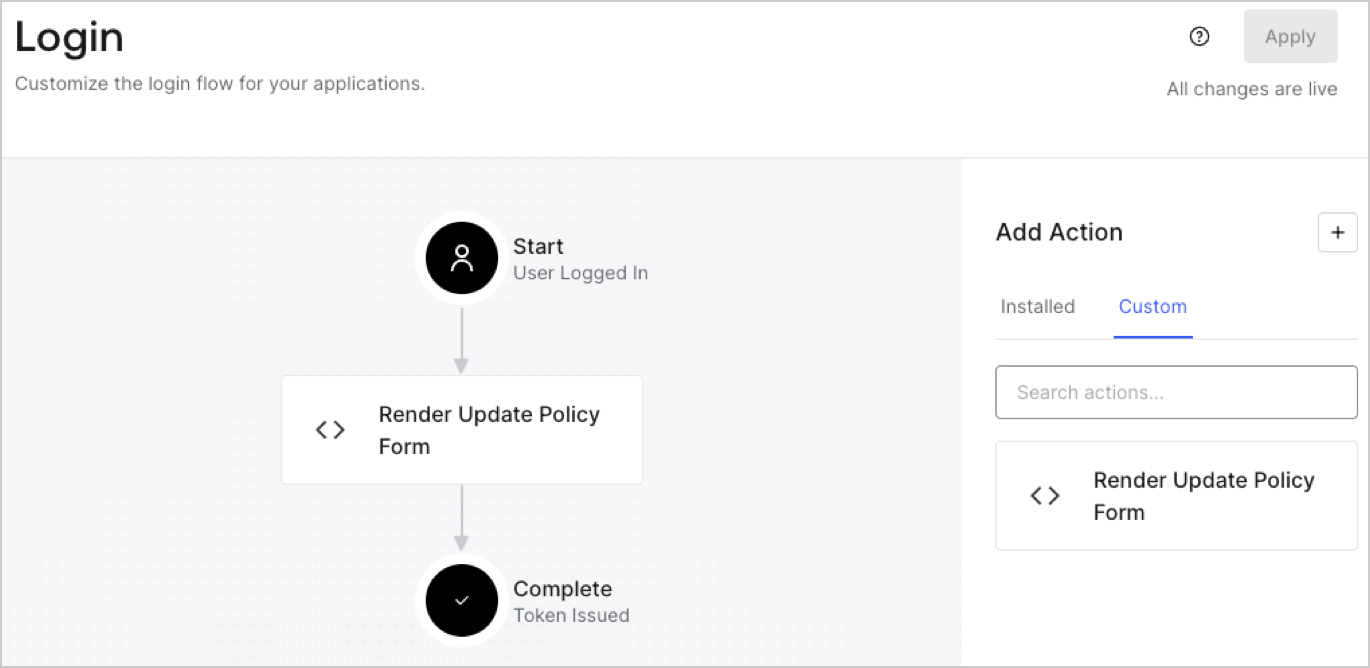
1. Accédez à **Auth0 Dashboard > Actions > Flows > Login.**
2. Sélectionnez l’icône **+**, puis **Build from scratch** :

   * **Nom** : Entrez `Render Update Policy Form`.
   * **Déclencheur** : Sélectionnez `Login / Post Login`.
   * **Runtime** : Sélectionnez la version recommandée.
3. Sélectionnez **Créer**.

Pour configurer l’action post-login :

1. Supprimez le code existant dans l’éditeur de code.
2. Collez le code de rendu du formulaire dans l’éditeur de code.
3. Modifiez le code pour définir la logique conditionnelle qui affichera le formulaire.

   ```javascript lines theme={null}
   /**
   * @param {Event} event - Détails sur l’utilisateur et le contexte dans lequel il se connecte.
   * @param {PostLoginAPI} api - Interface dont les méthodes peuvent être utilisées pour modifier le comportement de la connexion.
   */
   exports.onExecutePostLogin = async (event, api) => {
     const FORM_ID = 'REPLACE_WITH_YOUR_FORM_ID';

     if (event.user.app_metadata.privacy_policies !== true) {
       api.prompt.render(FORM_ID);
     }
   }

   exports.onContinuePostLogin = async (event, api) => { }
   ```

   <Callout icon="file-lines" color="#0EA5E9" iconType="regular">
     L’exemple de code ci-dessus affichera le formulaire si la propriété `privacy_policies` est absente de l’objet app metadata de l’utilisateur.
   </Callout>
4. Sélectionnez **Déployer**.
5. Glissez-déposez l’Action **Render Update Policy Form** dans le flux de **Login**.
   <Frame>
     <img src="https://mintcdn.com/docs-staging-chore-events-autoupdate/1kUZvJUL5DAi0-Zz/docs/images/cdy7uua7fh8z/5TOwDgevZsBqd7yZynUYWU/41ca909dc3007aed4f40ff794a05efa5/postlogin.png?fit=max&auto=format&n=1kUZvJUL5DAi0-Zz&q=85&s=6b60f897ec5e92295f275cb6fc42a617" alt="Dashboard > Forms > cas d’utilisation > action de connexion pour afficher le formulaire de mise à jour de la politique" data-og-width="1370" width="1370" data-og-height="668" height="668" data-path="docs/images/cdy7uua7fh8z/5TOwDgevZsBqd7yZynUYWU/41ca909dc3007aed4f40ff794a05efa5/postlogin.png" data-optimize="true" data-opv="3" srcset="https://mintcdn.com/docs-staging-chore-events-autoupdate/1kUZvJUL5DAi0-Zz/docs/images/cdy7uua7fh8z/5TOwDgevZsBqd7yZynUYWU/41ca909dc3007aed4f40ff794a05efa5/postlogin.png?w=280&fit=max&auto=format&n=1kUZvJUL5DAi0-Zz&q=85&s=c74242535504b1a28cc953e786724adf 280w, https://mintcdn.com/docs-staging-chore-events-autoupdate/1kUZvJUL5DAi0-Zz/docs/images/cdy7uua7fh8z/5TOwDgevZsBqd7yZynUYWU/41ca909dc3007aed4f40ff794a05efa5/postlogin.png?w=560&fit=max&auto=format&n=1kUZvJUL5DAi0-Zz&q=85&s=2d76361ce7e7b4cfdf4e4ebc83f906d7 560w, https://mintcdn.com/docs-staging-chore-events-autoupdate/1kUZvJUL5DAi0-Zz/docs/images/cdy7uua7fh8z/5TOwDgevZsBqd7yZynUYWU/41ca909dc3007aed4f40ff794a05efa5/postlogin.png?w=840&fit=max&auto=format&n=1kUZvJUL5DAi0-Zz&q=85&s=49d3d431a8b971b92dcb5dbed06a1432 840w, https://mintcdn.com/docs-staging-chore-events-autoupdate/1kUZvJUL5DAi0-Zz/docs/images/cdy7uua7fh8z/5TOwDgevZsBqd7yZynUYWU/41ca909dc3007aed4f40ff794a05efa5/postlogin.png?w=1100&fit=max&auto=format&n=1kUZvJUL5DAi0-Zz&q=85&s=5f5c2860f387e77d0affa5301cb6ecf5 1100w, https://mintcdn.com/docs-staging-chore-events-autoupdate/1kUZvJUL5DAi0-Zz/docs/images/cdy7uua7fh8z/5TOwDgevZsBqd7yZynUYWU/41ca909dc3007aed4f40ff794a05efa5/postlogin.png?w=1650&fit=max&auto=format&n=1kUZvJUL5DAi0-Zz&q=85&s=745c01b78659c0395bd77b2ed5aedb5e 1650w, https://mintcdn.com/docs-staging-chore-events-autoupdate/1kUZvJUL5DAi0-Zz/docs/images/cdy7uua7fh8z/5TOwDgevZsBqd7yZynUYWU/41ca909dc3007aed4f40ff794a05efa5/postlogin.png?w=2500&fit=max&auto=format&n=1kUZvJUL5DAi0-Zz&q=85&s=1bbb237ade1adfffff496eaf558f1856 2500w" />
   </Frame>
6. Sélectionnez **Appliquer**.

<h3 id="test-implementation">
  Test de la mise en œuvre
</h3>

Testez la mise en œuvre en suivant ces étapes :

1. Connectez-vous avec un utilisateur existant dont l’attribut app`_metadata` `privacy_policies` n’a aucune valeur.
2. L’Action post-login dans le flux de Login affichera le formulaire et demandera l’acceptation.
3. Sélectionnez **Auth0 Dashboard > User Management > Users,** repérez l’utilisateur et vérifiez que l’attribut `app_metadata` `privacy_policies` contient la valeur `true` ainsi qu’un horodatage.
