> ## Documentation Index
> Fetch the complete documentation index at: https://docs-staging-chore-events-autoupdate.mintlify.site/llms.txt
> Use this file to discover all available pages before exploring further.

> Découvrez comment créer une logique côté serveur à l’aide de Flows afin d’ajouter une logique décisionnelle et des intégrations externes à Forms.

# Flows

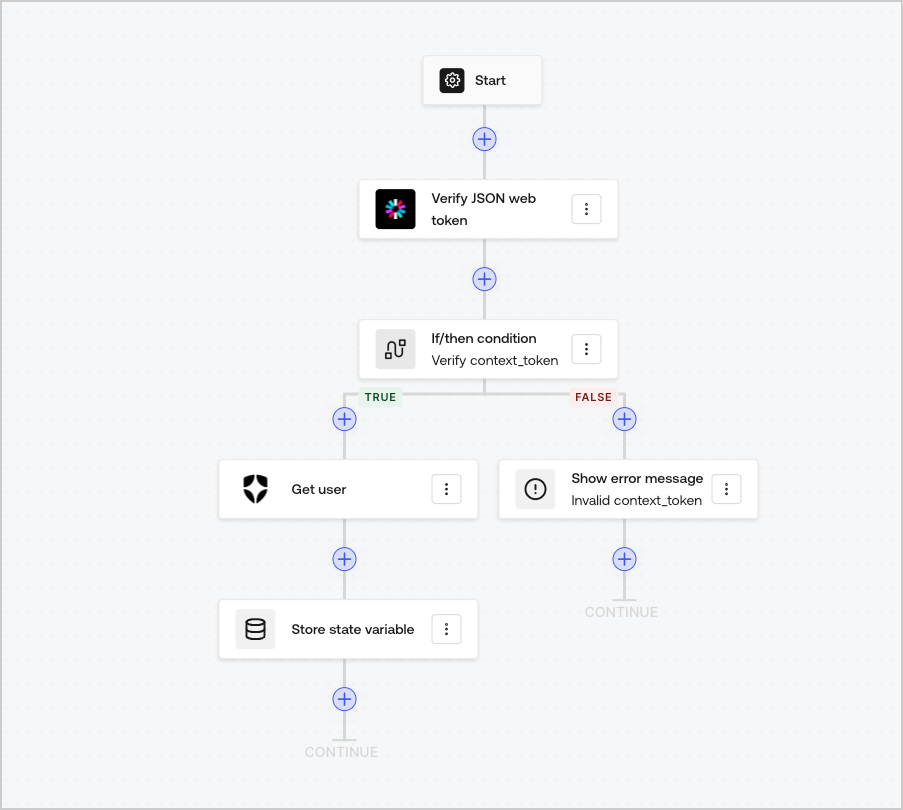
Flows vous permettent de créer visuellement la logique côté serveur que vous pouvez exécuter dans vos Forms pour traiter les données recueillies, intégrer n’importe quel service doté d’une API ou déclencher des automatisations.
<Frame>
  <img src="https://mintcdn.com/docs-staging-chore-events-autoupdate/98W2_Y-L23YJndAZ/docs/images/cdy7uua7fh8z/6u6Huh5CbH3GEQJv3AH7cx/e49ea613b2c46a43c83c89ffecddbafe/Flows.png?fit=max&auto=format&n=98W2_Y-L23YJndAZ&q=85&s=57881f654bfaf38796d3be5682340ded" alt="Dashboard > Forms > Flows" data-og-width="903" width="903" data-og-height="810" height="810" data-path="docs/images/cdy7uua7fh8z/6u6Huh5CbH3GEQJv3AH7cx/e49ea613b2c46a43c83c89ffecddbafe/Flows.png" data-optimize="true" data-opv="3" srcset="https://mintcdn.com/docs-staging-chore-events-autoupdate/98W2_Y-L23YJndAZ/docs/images/cdy7uua7fh8z/6u6Huh5CbH3GEQJv3AH7cx/e49ea613b2c46a43c83c89ffecddbafe/Flows.png?w=280&fit=max&auto=format&n=98W2_Y-L23YJndAZ&q=85&s=b04be379d8a29c23705b5a4cb7287980 280w, https://mintcdn.com/docs-staging-chore-events-autoupdate/98W2_Y-L23YJndAZ/docs/images/cdy7uua7fh8z/6u6Huh5CbH3GEQJv3AH7cx/e49ea613b2c46a43c83c89ffecddbafe/Flows.png?w=560&fit=max&auto=format&n=98W2_Y-L23YJndAZ&q=85&s=7c13f3c85220158976cb298b10bcdaf7 560w, https://mintcdn.com/docs-staging-chore-events-autoupdate/98W2_Y-L23YJndAZ/docs/images/cdy7uua7fh8z/6u6Huh5CbH3GEQJv3AH7cx/e49ea613b2c46a43c83c89ffecddbafe/Flows.png?w=840&fit=max&auto=format&n=98W2_Y-L23YJndAZ&q=85&s=812bea1278c00c720464f3f4a0f4feff 840w, https://mintcdn.com/docs-staging-chore-events-autoupdate/98W2_Y-L23YJndAZ/docs/images/cdy7uua7fh8z/6u6Huh5CbH3GEQJv3AH7cx/e49ea613b2c46a43c83c89ffecddbafe/Flows.png?w=1100&fit=max&auto=format&n=98W2_Y-L23YJndAZ&q=85&s=2b9d8f205608ab43a5b4be21aa413cec 1100w, https://mintcdn.com/docs-staging-chore-events-autoupdate/98W2_Y-L23YJndAZ/docs/images/cdy7uua7fh8z/6u6Huh5CbH3GEQJv3AH7cx/e49ea613b2c46a43c83c89ffecddbafe/Flows.png?w=1650&fit=max&auto=format&n=98W2_Y-L23YJndAZ&q=85&s=227a07a798a12c6154fb77b8bd62eda9 1650w, https://mintcdn.com/docs-staging-chore-events-autoupdate/98W2_Y-L23YJndAZ/docs/images/cdy7uua7fh8z/6u6Huh5CbH3GEQJv3AH7cx/e49ea613b2c46a43c83c89ffecddbafe/Flows.png?w=2500&fit=max&auto=format&n=98W2_Y-L23YJndAZ&q=85&s=4c47712355c4bb498fd3b306a2aafdbf 2500w" />
</Frame>

Vous pouvez utiliser les actions de Flows avec votre formulaire pour :

* Créer des validations personnalisées côté serveur pour les étapes de votre formulaire.
* Intégrer votre propre API en effectuant des requêtes HTTP personnalisées.
* Intégrer des services tiers à l’aide de nos intégrations prêtes à l’emploi.
* Exécuter différentes logiques d’affaires selon les saisies de l’utilisateur ou les propriétés.
* Valider des données à l’aide de <Tooltip tip="JSON Web Token (JWT) : format standard des ID Token (et souvent des jetons d’accès) utilisé pour représenter des claims de façon sécuritaire entre deux parties." cta="Voir le glossaire" href="/docs/fr-ca/glossary?term=JSON+Web+Tokens">JSON Web Tokens</Tooltip>.
